Pages

Tuesday, February 16, 2016

Enhanced add ons experience for Google Docs admins and developers


A year ago, we partnered with loads of great developers to showcase their add-ons for Google Docs. Add-ons have opened up a world of extra features for our users, from a student needing a powerful tool for diagrams to a project manager looking for a handy way to keep their team on track.

Today we’re releasing a couple of updates to help developers share their add-ons with an even wider audience and give Google Apps IT admins more consistent control over which add-ons are used in their organizations.

Developers can now choose to make their add-ons for Docs, Sheets and Forms available for installation across entire domains, which automatically creates a Google Apps Marketplace listing thats easy for customers to find. It also means that admins can install these handy add-ons for their whole organization using just a couple of clicks.


And speaking of admins, we want to make sure they have the control they need when it comes to deciding which add-ons are best suited for their organizations and teams. For example, in particular cases — like in education — it might not be desirable to let all end-users install their own add-ons. With this update, admins will continue to have a “disable add-ons” option for their users, but they can also whitelist add-ons via the Google Apps Marketplace for their entire domain or a specific team.

With these updates, customers can now get all the add-ons they want with all the control they need. Learn more about managing Google add-ons for your organization.
Read More..

The Uniqueness of Android – The Mobile Platform from Google

There is a huge furore and expectation in the mobile industry, after the announcement of “Android”, the mobile platform (consisting of an operating system, middleware and key applications), by Google last November. Its ripple effect in the developer community and the services industry is also pretty palpable.

In Google’s typical way, the 10 million dollar awards towards the best android applications had added the required momentum to bring the large developer community into its fold, and at the same time, harvest collective intelligence.

What is so unique about Android?
We have had many mobile OS like the Symbian, Windows Mobile OS, Mac OS X and Linux based Palm Nova, ALP etc, already flooding the market and fragmenting it.
So, why is another OS required?
If we are talking about something very radical, iPhone did it all. It took the market by storm with its mind-boggling features.
With all these in the market, isn’t android late? Still, why the interest?

Market Buy-in


Google has first of all roped in most of the players in the mobile market be it mobile operators, handset manufacturers, mobile application providers or software companies and even some commercialization companies.

The only significant players who are missing from the list for obvious reasons are:
1. Microsoft
2. Apple
3. Nokia
4. Palm
Two Major National US carriers missing are AT&T and Verizon.

Google is planning to keep it open source, the most happening way to get the acceptance in the market

Technically,
1. It is the only OS so far that allows integration / use of the basic phone features with any externally developed mobile application,
2. It is designed to simplify the reuse of components. Any application can publish its capabilities and any other application can use it. Taking the cue from the enterprise world on service oriented architecture, android has built it into its fundamental architecture
3. It is built on the open Linux Kernel
4. It will be open source
5. Mashup-ready: Embed browser and map views directly in your applications

To the End User:
1. Choice will be unlimited. The end user is not tied to using the basic features of the phone as provided by the handset manufacturer. He could use his own choice from any third party provider as the default feature of the phone
2. The ability to seamlessly integrate core and new applications will produce a new generation of unheard-of applications that are going to change the way the mobile would be used. Like for example, the ability to alert friends who are in the vicinity about your presence or the ability to be notified of all the shops that have a product you are looking for, as you enter a mall.
3. The open platform should provide more cheaper and innovative mobile devices and services
4. Application life cycle and automatic process management frees the end user from worrying about what applications are active
5. Location based services and notifications
6. Standard 2d and 3d graphics with optional acceleration
7. High quality audio/video support including H.264 (AVC).
8. Low power operation
Read More..

FL Studio Mobile apk


Description

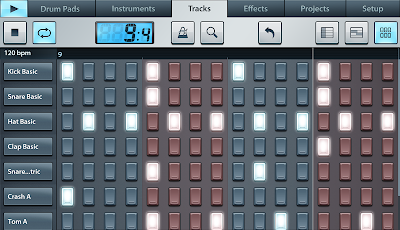
FL Studio Mobile allows you to create and save complete multi-track music projects on your Android phone or tablet device. You can even load the FL Studio Mobile projects into the FL Studio Desktop PC version* and take them to the next level. If it’s a beat on the step sequencer, a melody on the piano roll or a full song on the playlist, FL Studio Mobile has you covered. Never lose that idea again. Get it down and happening wherever you are.
FEATURES
• 133 high quality instruments, drum kits & sliced-loop beats
• All instruments have FL Studio desktop counterparts for FL Studio desktop import and extension
• Step sequencer for fast percussion programming and sliced-loop reworking
• Configurable virtual piano-keyboard
• Drum pads
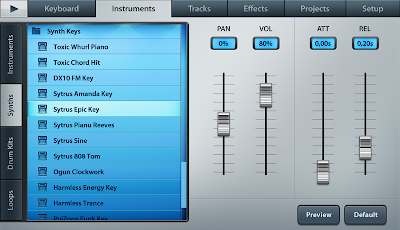
• Browser with preview button and logical sorting into Instruments, Synths, Drum kits & Loops
• Pan, volume, release and attack time configurable per instrument
• Pitch bend via accelerometer
• High quality, battery-friendly audio engine (latency depends on the device)
• Drum loops and sliced loops ready to start your project with a cool beat
• Effects include Limiter, Reverb, Delay, EQ, Amp simulator & Filter to enhance your mix.
• 99 track sequencer and intuitive editing options
• Per-track mute, solo, effect bus, pan and volume adjustment
• Edit at the level of tracks, bars or down to individual notes
• Piano roll editor for manual entry of note & chord sequence data or detailed editing of recorded performances
• Undo and redo for all editable screens
• Metronome with tempo & time-signature settings
• Intuitive positioning of screens with the slide gesture and resize with the pinch gesture
• Save and load your songs, export to WAV and AAC
• MIDI file import/export
• Share your songs via Email or Dropbox
• In-app user manual
• Android 2.3.3 required
• Works with all screen resolutions, but FL Studio Mobile is optimized for 1280x800, 800x480, 960x640 and 480x320 screens.
.
* "FL Studio" desktop PC version (sold separately) is installed, on average, over 30,000 times each DAY making it one of the worlds most popular and exciting music production systems. Everything you need in one package to compose, arrange, record, edit, mix and master professional quality music, the perfect studio partner for FL Studio Mobile. You can download the demo version of the FL Studio Desktop PC version and enhance your FL Studio Mobile projects for free then save to .mp3, .wav, .ogg or .mid format.


DOWNLOAD (APK + DATA OBB)
Read More..

Monday, February 15, 2016

Inspire Envy the HTC One M8

The HTC One M8 is not just a „better HTC One” as some might think. Honestly saying, I’ve been thinking the same way before I had a chance to hold this beauty in my hand for a first time. Lets put aside the hardware specification for now. Before I’ll review the newest HTC One M8 let me show you some close, high quality pictures of the youngest HTC piece of art.


Do you have any questions or comments? Feel free to share! Also, if you like this article, please use media sharing buttons (Twitter, G+, Facebook) below this post!


For latest news follow Android Revolution HD on popular social platforms:

Read More..

Control protected ranges and sheets in Google Sheets with Apps Script

A few weeks ago, the Google Sheets team introduced improved control over protected sheets and ranges. Developers have told us theyre looking for the same power in Google Apps Script — after all, ever since we added data validation to the Spreadsheet service, programmatic control over protected ranges has been the most popular request on the Apps Script issue tracker.

Today, we are excited to give you that granular control.

With the new Protection class in the Spreadsheet service, your scripts can touch every aspect of range or sheet protection, just like in the new UI. (The older PageProtection class, which had more limited features, will be deprecated, but will stick around in case you need to work with older spreadsheets. The new Protection class only applies to the newer version of Sheets.)

Code samples


So lets see the new stuff in action. Lets say you want to prohibit anyone other than yourself from editing cells A1:B10:

// Protect range A1:B10, then remove all other users from the list of editors.
var ss = SpreadsheetApp.getActive();
var range = ss.getRange(A1:B10);
var protection = range.protect().setDescription(Sample protected range);

// Ensure the current user is an editor before removing others. Otherwise, if the users edit
// permission comes from a group, the script will throw an exception upon removing the group.
var me = Session.getEffectiveUser();
protection.addEditor(me);
protection.removeEditors(protection.getEditors());
if (protection.canDomainEdit()) {
  protection.setDomainEdit(false);
}


Or maybe you want to remove all range protections in the whole spreadsheet:

// Remove all range protections in the spreadsheet that the user has permission to edit.
var ss = SpreadsheetApp.getActive();
var protections = ss.getProtections(SpreadsheetApp.ProtectionType.RANGE);
for (var i = 0; i < protections.length; i++) {
  var protection = protections[i];
  if (protection.canEdit()) {
    protection.remove();
  }
}


Or perhaps you want to protect an entire sheet, but carve out a small hole in it — an unprotected range within a protected sheet — that others can still edit:

// Protect the active sheet except B2:C5, then remove all other users from the list of editors.
var sheet = SpreadsheetApp.getActiveSheet();
var protection = sheet.protect().setDescription(Sample protected sheet);
var unprotected = sheet.getRange(B2:C5);
protection.setUnprotectedRanges([unprotected]);

// Ensure the current user is an editor before removing others. Otherwise, if the users edit
// permission comes from a group, the script will throw an exception upon removing the group.
var me = Session.getEffectiveUser();
protection.addEditor(me);
protection.removeEditors(protection.getEditors());
if (protection.canDomainEdit()) {
  protection.setDomainEdit(false);
}


Bam! Easy. Hope you find this useful, and happy scripting!

Posted by Sam Berlin, engineer, Google Sheets
Read More..

Sunday, February 14, 2016

Pennsylvania schools prepare students for future success with the 4Cs and Google for Education


Editors note: Were going across the country to highlight the great things schools are doing with technology. We talked to educators and administrators in Pennsylvania to hear how they’re creating innovative learning environments. Technology is empowering teachers to transform traditional classrooms into collaborative student-driven environments in the historic Keystone State. Pennsylvania is setting the pace for Northeast schools through its success with Google for Education. To learn more about Google solutions for Education, join us for a webinar on January 28th at 3pm ET / 12pm PT.

Education in the 21st century is about more than making sure students pass the class and understand the concepts. It’s centered around teaching students skills for the future, commonly known as the 4Cs: creativity, communication, critical thinking and collaboration. Schools in Pennsylvania are using Google for Education tools to provide teachers with the resources they need to bake the 4Cs into their lesson plans and provide students with diverse learning opportunities. We’re highlighting a few ways Pennsylvania schools are teaching students 21st century skills:


Fueling creativity and student-driven learning 


With Google Classroom, students at Indiana Area School District have the tools to receive one-on-one instruction outside of the classroom and create innovative projects that they’re passionate about. With 24/7 access to their teachers via Classroom, students can request feedback as they work on an assignment and ask questions that they might not have felt comfortable asking in class. If students prefer face-to-face feedback, they can hop on a Google Hangout with their teacher.

“Google Apps for Education has enabled me to give kids more opportunities to work together and with me. It puts the kids at the center of their education,” says Matt Neil, social studies teacher at Indiana Area Senior High School.

Teachers direct students to shared resources to help them improve certain skill sets, so they can expand their creativity. “With Google for Education, students gain autonomy while teachers have the means to pervasively develop new curriculum and learning opportunities,” says Rich Kiker, certified Google Education Trainer and founder and CEO of Kiker Learning, a Google for Education professional development implementation partner.


Creating stronger lines of communication among teachers 


Teachers at Pennsbury School District use Google Apps for Education to create a shared resource hub, so they can provide students with more individualized learning opportunities. Teachers communicate about students’ learning styles, strengths and areas for improvement and can easily find resources that help them learn best, whether they’re visual, auditory or tactile learners.

“As a special educator, I can easily share and edit Google Docs with teachers to best meet the needs of the students,” says Jeanne Caputo, teacher and room support provider at Charles Boehm Middle School. “When I don’t have time to fully prep teachers in person, Google for Education lets us quickly communicate student goals and plans.”

“Greater communication has a direct positive impact on individual and team effectiveness,” says Amanda Durham, English teacher at Pennsbury High School. “Diversifying learning experiences, in terms of content or medium, truly enhances curriculum.”


Reinforcing the power of critical thinking 

Middle school students in Wilson School District using Chromebooks in the classroom


The mission at Wilson School District (case study) is to empower students to create their own future. Teachers put this mission into action by teaching students the 4Cs and providing them with technology skills they’ll need for future success. Students use devices with Google Apps for Education in a 1:1 environment, so they can engage with technology throughout the school day. These tools give students access to countless ideas, perspectives and methods for solving problems, empowering students to ask questions and take a critical approach to learning.

“In pretty much any career path we choose, it’s guaranteed that we will need the knowledge and skills to work with technology,” says Sneha Anmalsetty, a junior at Wilson High School. “The 1:1 initiative is guiding us towards becoming better technology users.”


Boosting collaboration across grade levels


At Wilson School District, second grade students are using Google Hangouts to collaborate via a virtual shared classroom with seventh grade students in New Jersey. The second graders submit science questions using Google Forms that the seventh graders use as inspiration for presentations, videos and other learning tools. Once their research is complete, seventh graders teach virtual classes answering the second graders’ questions.

“The creativity, communication, collaboration and critical thinking skills the students in those two classrooms are developing through the use of Google for Education is life-changing,” says Dr. Amy Flannery, director of curriculum for Wilson SD. “Google’s impact on lesson creation and delivery is radically changing curriculum development.”

We’ve heard great stories from many of you about how you’re using technology to do amazing things in your schools, so were going across the U.S. to see for ourselves! Check out the map below to see where we’ve been. We’d love to hear what’s happening in your state, so please share your story on Twitter or Google+ and tag us (@GoogleForEdu) or include the #GoogleEdu hashtag.


Read More..

Friday, February 12, 2016

Using schema org markup to promote your critic reviews within Google Search

Posted by Jonathan Wald, Product Manager

When Google announced Rich Snippets for reviews six years ago, it provided publishers with an entirely new way to promote their content by incorporating structured markup into their webpages. Since then, structured data has only become more important to Google Search and we’ve been building out the Knowledge Graph to better understand the world, the web, and users’ queries. When a user asks “did ex machina get good reviews?”, Google is now aware of the semantics - recognizing that the user wants critic reviews for the 2015 film Ex Machina and, equally importantly, where to find them.

With the recent launch of critic reviews in the Knowledge Graph, we’ve leveraged this technology to once again provide publishers with an opportunity to increase the discoverability and consumption of their reviews using markup. This feature, available across mobile, tablet, and desktop, organizes publishers’ reviews into a prominent card at the top of the page.

By using markup to identify their reviews and how they relate to Knowledge Graph entities, publishers can increase the visibility of their reviews and expose their reviews to a new audience whenever a Knowledge Graph card for a reviewed entity is surfaced.

Critic reviews are currently launched for movie entities, but we’re expanding the feature to other verticals like TV shows and books this year! Publishers with long-form reviews for these verticals can get up and running by selecting snippets from their reviews and then adding schema.org markup to their webpages. This process, detailed in our critic reviews markup instructions, allows publishers to communicate to Google which snippet they prefer, what URL is associated with the review, and other metadata about the reviewed item that allows us to ensure that we’re showing the right review for the right entity.

Google can understand a variety of markup formats, including the JSON+LD data format, which makes it easier than ever to incorporate structured data about reviews into your webpage! Get started here.


Read More..