Pages

Thursday, May 26, 2016

Tixsee builds a slam dunk ticket buying experience for the Dallas Mavericks using Google Maps APIs


(Cross-posted on the Google Geo Developers Blog.)

Editor’s note: Today’s guest blogger is Brett Dowling, founder and President of Tixsee, an innovative Fan Experience Management Platform for the sports, entertainment and venue management industries. Read how Tixsee used Google Maps APIs to build a unique ticket-purchasing platform for the Dallas Mavericks.

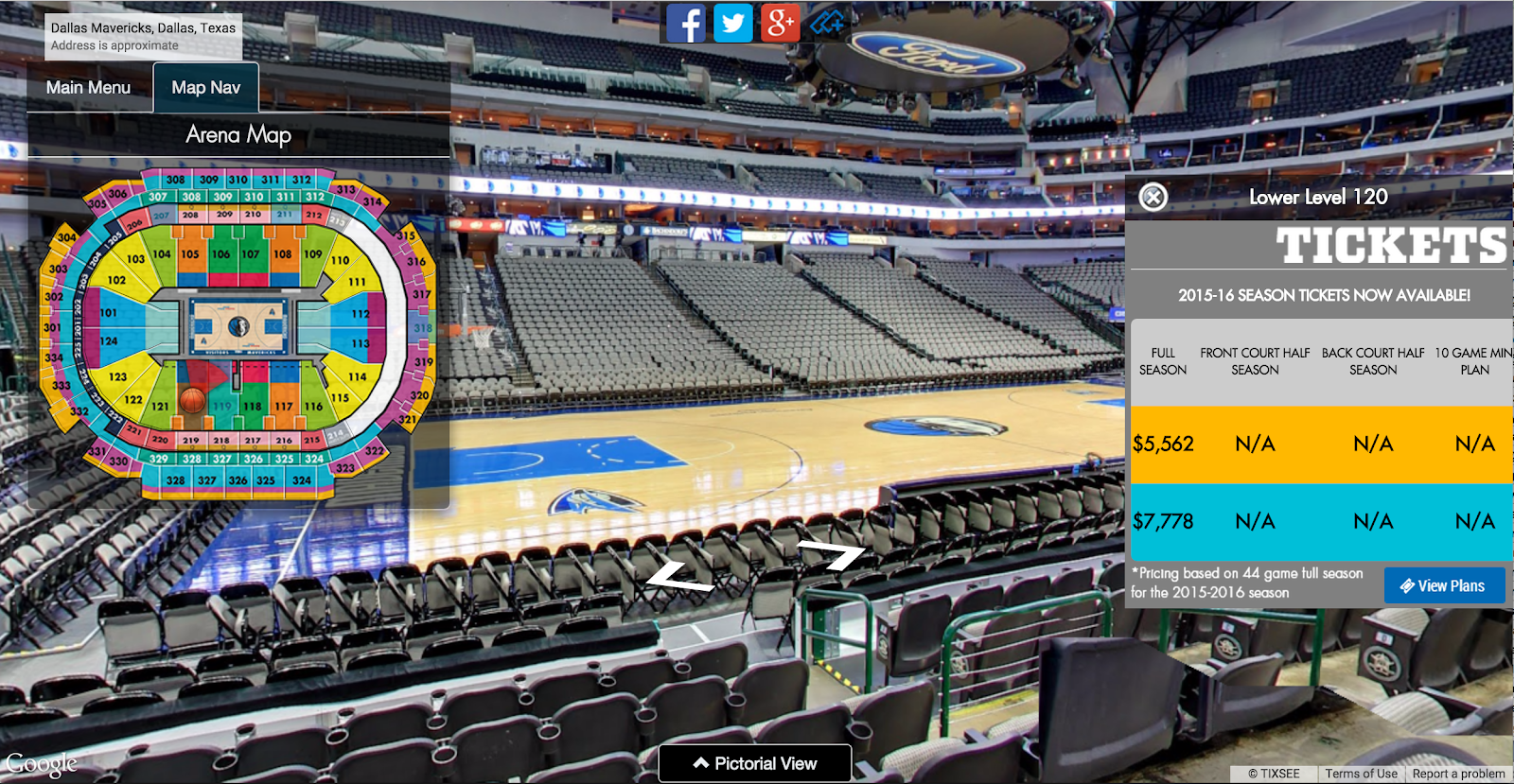
When you go to a basketball game, you want to make sure you get great seats, secure an awesome view of the court and are able to find your way around the arena. That’s what we’re doing for fans of the Dallas Mavericks with our Tixsee platform, an immersive shopping experience that lets people see the view from their seats before purchasing.

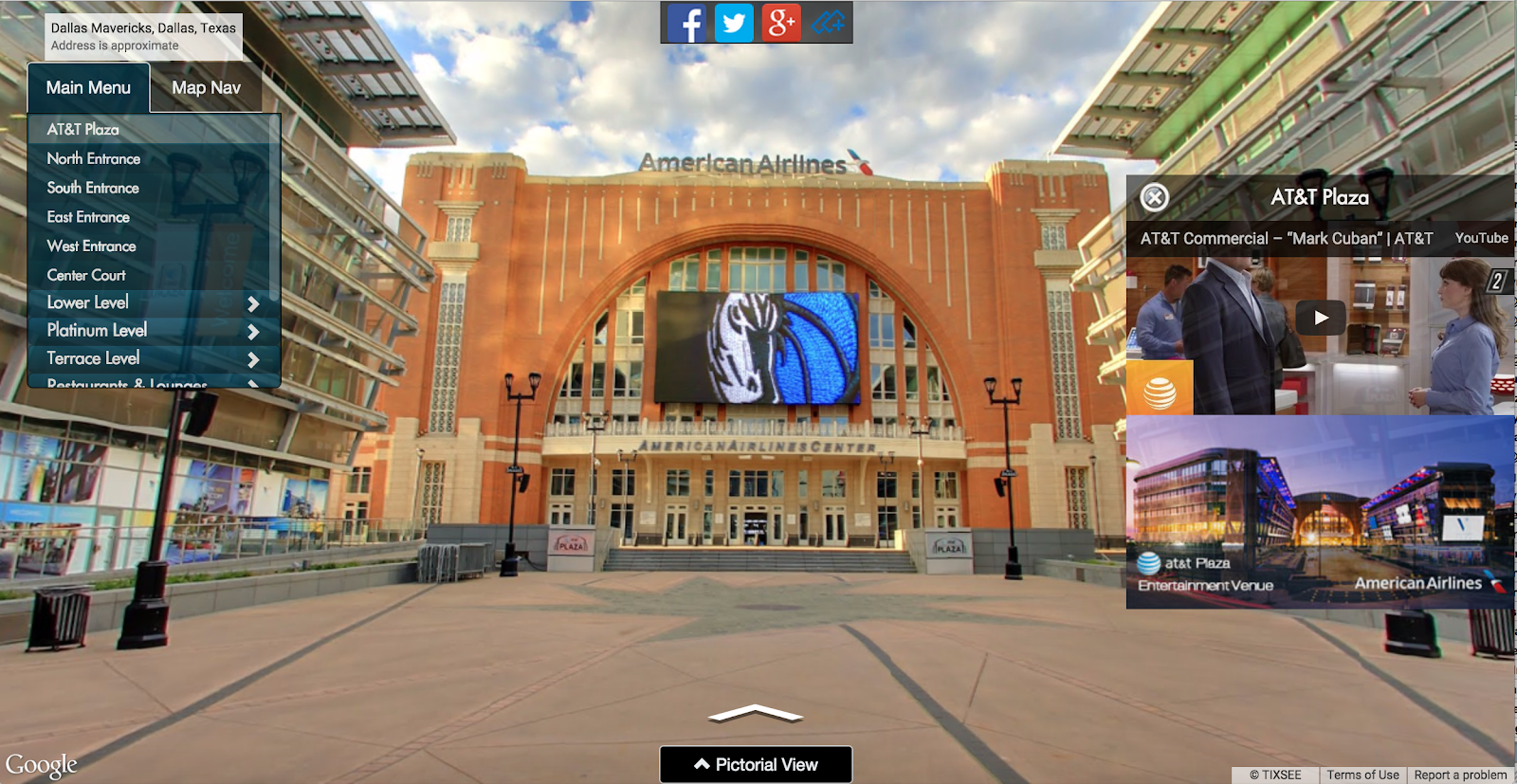
From the Mavericks’ Web site, fans can take a tour of the arena, stroll the aisles to see the view of the court from any seat, then buy a ticket. They can also tour the Mavericks’ store and buy team gear. Visitors make their way around the arena using familiar Street View controls. We used the Google Maps Street View Service in the Google Maps JavaScript API to build this experience. We worked with Business Photos America, a Google Maps Business View Trusted Agency, to take more than 12,400 images of the arena. We used those images to create more than 1,000 high-definition panoramas that re-create the arena in 3D.
PastedGraphic-1.png

The Mavericks’ ticketing platform is much more than just the site’s interactive interface. Just as important is the content management system (CMS) that lets the team do things like create special offers to drum up excitement and increase ticket sales. We use the Google Maps Embed API to embed the Street View imagery inside the CMS. The backend users can then orient the panoramas and preview campaigns before deploying to the live project. For a social media campaign, they hid a photograph of an autographed team ball in the virtual arena, and the first person to find the ball online was able to keep it. Traffic to the site spiked.
PastedGraphic-2.png
We’ve got a lot more planned, especially for mobile, because we know people will be bringing their phones to the arena. We have plans to release apps for iOS and Android in the near future. We’ll be using the Google Maps Directions API so people can find their way to one of the eight parking lots near the arena, then navigate right to their seats. It’s all part of our ultimate goal: to build a platform for the Mavericks that intensifies the fan experience and reinforces the value of purchasing tickets to live events at the arena.
Read More..

How To Find a proper firmware variant for the HTC device


This guide is related to the previously published article - How To: Flash firmware package on the HTC device. The goal of this guide is to expose the problem of a matching firmware version for the particular HTC device. Please read it carefully and in case of any questions leave a proper comment in the comments section at the end of this article.

Every firmware.zip has 2 main attributes: modelid (MID) and cidnum (CID).

  • MID contains a codename of your device. For example the "0P6B1000" is the international version of the HTC One M8, while the "0P6B13000" is the T-Mobile U.S. version of the HTC One M8.
  • CID is the carrier software codename. For example the "HTC__J15" code represents the unbranded international version of the HTC One M8, while the "T-MOB010" code represents the T-Mobile U.S. software. Different CID numbers are usually used for mobile operators to include different regional settings, languages or to include some extra software (Wi-Fi Calling, Visual Voice Mail etc.).

Both MID and CID can be found in the android-info.txt inside each firmware.zip. This is how android-info.txt looks like (as an example I used firmware.zip from the international version of the HTC One M8):


Once you know the version of the firmware you have, you need to check if your device can be safely flashed with that particular firmware.zip. To check that:
  1. Download this mini-sdk package and extract it to c:mini-sdk
  2. Connect your device to the PC
  3. Boot your device in fastboot mode (vol down + power ===> fastboot)
  4. Open a command prompt on the PC (cmd.exe), type and confirm each command with ENTER:
  5. cd /d c:mini-sdk
  6. fastboot getvar all

This is an example output from the international version of the HTC One M8:


What you are looking for is the "modelid" and "cidnum".
  • If your device is S-ON then both modelid and cidnum must match.
  • If your device is S-OFF then modelid is critical to match, but cidnum can be changed either by changing CID of your device or by editing android-info.txt.
  • Edited firmware.zip cant be flashed on the S-ON device.
  • If your device is S-ON then you cant downgrade your current firmware version.
If both CID and MID numbers match you can safely flash the firmware.zip package - How To: Flash firmware package on the HTC device.

Do you have any questions or comments? Feel free to share! Also, if you like this article, please use media sharing buttons (Twitter, G+, Facebook) below this post!


For latest news follow Android Revolution HD on popular social platforms:

Read More..

Tuesday, May 24, 2016

Stickman Impossible Run Hack free Download for Android iOs No Password No Survey

Stickman Impossible Run Hack for Android/iOs 

Today our site freemasterhack.blogspot.ro release Stickman Impossible Run hack Tool.We do hard work to make hack to one of the most popular game on Android&iOS.Our Hacks&Cheats and Applications are completly free from viruses.With our Hack you can add Unlimited Coins,Energy and more.Stickman Impossible Run  Hack Download Tool is avaliable for all Android & iOS devices.Dont wait and Download our Hack Tool and HAVE FUN!!


Run for your life in this fast paced action packed platform runner demanding your fastest reflexes and rewarding you with a lot of fun while mastering all platforms, stage for stage. Run in various different tracks, space wrap through unique stages and achieve a top ranking against all other players worldwide. Simple, addictive, a Djinnworks classic!
???????? ?? ??????? stickman impossible run hack

 Features:
– Various unique designed tracks
– New tracks every day
– Daily challenges
– Insane high speed tracks
– Compare against your friends and everyone worldwide
– Replay your runs and share them with your friends
– Various achievements to unlock
– No in-apps required, everything unlocked, everything playable
– Supports MOGA game controllers

 Download

Read More..

HTC One M8 2014 first custom recovery first custom ROM


Yesterday the new HTC One M8 was launched and today I would like to inform you that you can already root it and flash your favourite custom ROM on it! :)

Custom recovery for the HTC M8 - link
Android Revolution HD for the HTC M8 - link

Have any questions or comments? Feel free to share! Also, if you like this article, please use media sharing buttons (Twitter, G+, Facebook) below this post!


For latest news follow Android Revolution HD on popular social platforms:

Read More..

More details about the HTC M8

In a few months well most likely see new high-end device from HTC. Some of the current rumours were true, but here comes much more details youve never heard before!

Device will be named HTC One+ (codename: HTC M8) and it wont have any capacitive buttons. No more "home" or "back" buttons we get used to with the HTC One (HTC M7). Camera is probably a 6MP or 8MP module, of course with the UltraPixel™ technology and probably the new HTC ImageChip™ 3. Current rumours about double lens (for low and high lighting) might be true as well. Battery capacity is much bigger now - 2900 mAh instead of 2300 mAh in the HTC One. With just a slightly bigger screen in the HTC One+ (5") versus HTC One (4,7") we can expect much better battery life.

Chipset (SoC) is very likely to be Snapdragon 805 (instead of 800). This is a very good news because Snapdragon 800 is already quite an "old" chipset. The only problem is the drivers development by Qualcomm. Lets hope that wont stop HTC from replacing S800 with the S805.

In contrast to the HTC One, the One+ will have removable micoSD card. The non-removable microSD card in the HTC One was a source of a lot of critics from Android fans. Hopefully the design of the HTC M8 wont suffer from that.


HTC One+ will be equipped with the newest HTC Sense™ 6.0 and Android KitKat.

So what do you think? Im already very excited and really cant wait for the HTC One successor. The HTC One won almost every award in the 2013 knocking out the competition. Lets hope the HTC One+ will repeat this great success!

To summarize:
  1. Name: HTC One+ (HTC M8)
  2. Screen: 5" FullHD 1080p covered by Gorilla Glass 3
  3. Battery: 2900mAh
  4. Camera: 6MP or 8MP with UltraPixel™ technology and double lens
  5. SoC: Qualcomm® Snapdragon™ 805
  6. RAM: 2GB LPDDR3
  7. Buttons: no capacitive buttons
  8. OS: Android KitKat with HTC Sense™ 6.0
  9. SIM: micro-SIM
  10. Front camera: 2.1MP
  11. NFC: yes
Have any questions or comments? Feel free to share! Also, if you like this article, please use media sharing buttons (Twitter, G+, Facebook) below this post!
Read More..

Reminder to migrate to updated Google Data APIs

Over the past few years, we’ve been updating our APIs with new versions across Drive and Calendar, as well as those used for managing Google Apps for Work domains. These new APIs offered developers several improvements over older versions of the API. With each of these introductions, we also announced the deprecation of a set of corresponding APIs.

The deprecation period for these APIs is coming to an end. As of April 20, 2015, we will discontinue these deprecated APIs. Calls to these APIs and any features in your application that depend on them will not work after April 20th.

Discontinued APIReplacement API
Documents List APIDrive API
Admin AuditAdmin SDK Reports API
Google Apps ProfilesAdmin SDK Directory API
ProvisioningAdmin SDK Directory API
ReportingAdmin SDK Reports API
Email Migration API v1Email Migration API v2
Reporting VisualizationNo replacement available

When updating, we also recommend that you use the opportunity to switch to OAuth2 for authorization. Older protocols, such as ClientLogin, AuthSub, and OpenID 2.0, have also been deprecated and are scheduled to shut down.

For help on migration, consult the documentation for the APIs or ask questions about the Drive API or Admin SDK on StackOverflow.

Posted by Steven Bazyl, Developer Advocate
Read More..

Monday, May 23, 2016

HTC Sense 7 0 G version explained

Together with the latest and greatest HTC One A9 we saw the HTC Sense 7.0 "G" edition user interface for the first time. What exactly is the "G" version and how it differs from the "regular" version?

Probably the "G" comes from a "Google", because HTC wanted it be as close to the stock Android 6.0 Marshmallow UX as possible, allowing for certain carrier requirements and feature necessities. So, for example, in the "G" edition we have the stock notification window and Quick Settings, while the full Settings menu is HTCs Sense version due to carrier customization requirements.

HTC Sense 7.0 (left) vs HTC Sense 7.0 "G" (right)

HTC also worked to reduce or eliminate duplicative apps in every case possible. So, for example, the HTC Music player is gone in favour of Google Music. In a couple cases HTC needed to pre-load HTCs apps to support certain features, such as HTC Gallery to support RAW images, in addition to Google Photos. So whats gone for sure?

- HTC Backup
- HTC Music
- Print Studio
- One Gallery
- Peel Smart Remote
- Polaris Office
- Scribble

All the rest seems to be still there. And it doesnt look much different to the Sense 7.0 "regular" version because a lot of components (such as Calendar, Mail, Clock, Camera, Sense Home, Weather etc.) are accessible via Google Play store. Whats also different is the HTC default accent colours, the "G" edition is a bit less colourful.

HTC Sense 7.0 (left) vs HTC Sense 7.0 "G" (right)

HTCs  plan when M8 and M9 begin rolling out Android 6.0 Marshmallow is to maintain UX consistency with Sense 7.

The main screen looks exactly the same, as well as most parts of the UI (except the colours scheme).

HTC Sense 7.0 (left) vs HTC Sense 7.0 "G" (right)

Do you have any questions or comments? Feel free to share! Also, if you like this article, please use media sharing buttons (Twitter, G+, Facebook) below this post!


For latest news follow Android Revolution HD on popular social platforms:

Read More..