Pages

Friday, June 10, 2016

Setting up the Samsung Chord SDK

Continuing from the previous posts, I would like to write about setting up the development environment for using the Chord Android SDK and give an overview of the main classes to be used for your first program (to come in a later article).

This is towards aiding android developers in writing apps for the Samsung Android Contest.

  1. Download the Samsung Chord SDK available here
  2. Download the Samsung Chord SDK emulator also available here (need to accept the license agreement in order to download both)
  3. Add the Eclipse plugin for Chord SDK as described in "Chord SDK Emulator Guide ver1.2".
  4.    You can download sample apps from the chord sdk link and run it on the emulator.
  5. The screen shot shows the basic interface of the sample demo. Of course, this can meaning fully execute only after you start the Chord Relay server in the eclipse environment which shows the console and how the UDP broadcast is happening from the emulator. This allows you to do basic stuff like Starting Chord, Joining and leaving a channel.


While the above shows the basics in terms of getting up the first Samsung chord SDK app to work, we need to understand what the Android SDK gives us and what are the classes we have to use to create our own app.

What are the basic classes and interfaces provided by the Chord Android SDK? All of the fundamental ones are described here:

ChordManager– This forms the core of the SDK. This is used to create a Node and helps in managing which nodes are connected to which channels. If you want to know more about channels and nodes, please refer the previous article.

This is the class that hides all the network complexity from the developer. These are the basic features provided by this class:
  1. Tells you the list of available network interfaces like wi-fi or Mobile Access Point etc.
  2.  It gives you an option to start and stop chord
  3.  It gives you an option to leave or join a channel
  4.  Helps you list all the channels the node has joined
  5. And also provides a way to hook up a network listener to respond to changes in the network status.


Most of the main service or game or whatever your application is aiming to achieve through node interactions should be through using the Chord Manager. However, your app – the game or service will also have to provide implementation for 3 listeners:

  1. INetworkListener-  ChordManagerhas to listen on this listener to understand the changes in the network state – whether connected or disconnected to the network (of choice – wifi, wifi direct etc.)
  2.  IChordChannelListener– It is through this listener you will have to implement all actions that need to happen when a node joins the network or leaves a network.  Through this you also need to implement what happens when a file/data is received or sent.
  3. IChordManagerListener– is a listener that needs to be implemented when you start your ChordManager. This is required to handle the changes when a ChordManagerstarts. Also, after starting, the ChordManager, if there is an error or a network disconnect, what should the ChordManagerdo – is defined in the implementation of this listener.

The above 4 classes/listeners help in implementing your own service that can be used with all your nodes in the network.

However, while you have the entire above service ready, you need to decide which channels are you interested in interacting with?  It could be the public channel or a private channel with a specific name or even many at a time.

The specific channel implementations are those classes that a developer needs to develop by implementing the IChordChannelInterface.

The interface provides the methods for sending and receiving data.

So, in summary, you have the crux of what you really want to do in your own implementation of the IChordChannel.

However, the ChordManagerhelps you manage connecting and communicating with various nodes in the private or public channels by using 3 listeners.

It is as simple as that. Hope this clarifies the Samsung Chord SDK a bit in order for you to be able to take part in the Samsung Smart App Challenge.


Sponsored by Samsung


Read More..

Clash of Clans Hack Android iOs No Survey No Password

Clash Of Clans Cheat No Password/No Survey for Android/iOs

Today our site freemasterhack.blogspot.ro release Clash of Clans hack Tool.We do hard work to make hack to one of the most popular game on Android&iOS.Our Hacks&Cheats and Applications are completly free from viruses.With our Hack you can add Unlimited Coins,Energy and more.Clash of Clans Hack Download Tool is avaliable for all Android & iOS devices.Dont wait and Download our Hack Tool and HAVE FUN!!


???????? ?? ??????? clash of clans cheat

Clash of Clans hack for android and other mobile platform, No more problem on getting unlimited gold, elixir or Gems. Unlocking all levels in Clash of Clans also using our Hack Tool is very easy to achieve. Now we happy to announce the release of our Clash of clans hack app that can hack Clash of clans with a click of a button only. If you love playing COC and having a hard time beating your opponent in game, then you are lucky to use this tool to finish the Game Faster by Unlocking or Setting all the Resources to Unlimited through Cheats. There are hundreds of clash of clans players using our cheat tools just to obtain unbelievable amount of Free gems, gold, food and elixir being generated for free easily and Lead your clan to winning the clash.

Clash of Clans hack with their amazing features:

  •  Obtain Unlimited Gems
  •  Obtain Unlimited Elexir
  •  Obtain Unlimited Gold
  •  Obtain Lots of other Resources
  •  Works with PC, Mac OS, all browsers and all mobile devices(Android iOS)
  •  Free Automatic check for new updates
  • Free to use on jailbreak or non jailbreak users
 Download

Tags:

Read More..

Wednesday, June 8, 2016

Implosion Never Lose Hope 1 0 6 MOD APK Unlocked Android Obb Download

Implosion Never Lose Hope 1.0.6 Apk Full Version Data Files Mod Download

Implosion Never Lose Hope 

Note: Download All The Parts Provided and extract any of them, it will automatically extract all the parts. Install .apk File And place data folder in SDcard/Android/obb/ and Start playing.

DOWNLOAD LINKS


Download From PlayStore
Click Here For APK+Data Files Download
Read More..

Smash Hit Hack Unlimited Balls No Password No Survey for Android iOs

Smash Hit Hack Unlimited Balls [No Password] [No Survey] for Android/iOs


Hi friends, are you in need of the Smash Hit Cheats, you are lucky because you have the chance to download The Smash Hit Hack for Android and iOS devices. Smash Hit Hack will generate for you great amounts of Balls! All the features we prepared for you is fully available in The Smash Hitcheats which can be founded below this text. We made the “Protection script” in our Smash Hit Hack Tool to protect your mobile phones. Smash Hit Hack comes with automatic updates so you won´t have worries about its security. Smash Hit Hack is simply designed and it has user-friendly interface so the Smash Hit cheat is so easy to use. Smash Hit Cheats needs to connect with your Android or iOS devices to transfer the data. Smash Hit Cheat is fully working with all iOS devices and it doesn´t require jailbreak to run. Smash Hit Hack will also work with Android too.
???????? ?? ??????? smash hit hack
Features:
– Smash Hit unlimited Balls #
– Smash Hit Unlock Premium #
– 100% High Quality Smash Hit Protection Script #
– Works for all iOS and Android devices #
– Root or jailbreak NOT required #
– Quick and simple device connection #
– Clear design and user friendly interface #
– Automatic updates
 Download

Incoming search terms:

  • smash hit hack
  • how to hack smash hit android
  • smash hit cheats for android
  • smash hit hack free download
  • hacked smash hit apk
  • hack smash hit apk
  • smash hit cheats android
  • hack smash hit
  • hack for smash hit
Read More..

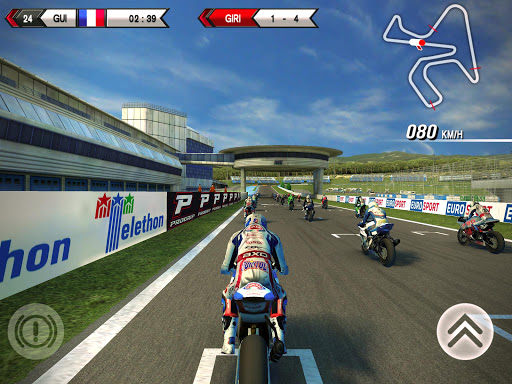
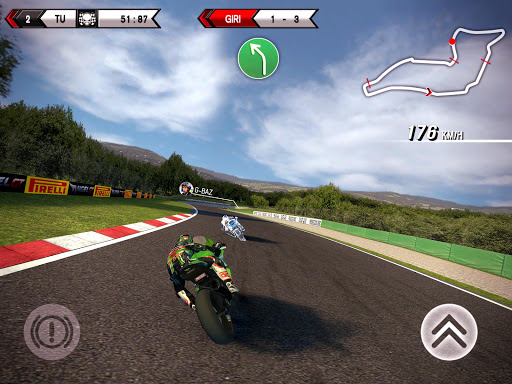
SBK15 Official Mobile Game v1 1 1 APK DATA PAID

Cover art
https://play.google.com/store/apps/details?id=it.dtales.sbk15
NEW!!! Check out the “Mission: Impossible - Rogue Nation” bonus track: be an IMF agent and outrun the Syndicate to retrieve classified intel in Casablanca!

With over 4.5 million downloads under its belt and the support of passionate fans worldwide, the SBK Official Mobile Game is back for a new season.


Join the fray in the 2015 eni FIM Superbike World Championship: pick the bike of your dreams from the biggest brands in the world (Aprilia, Kawasaki, Honda, Ducati, Suzuki, MV Agusta, BMW) and hit the track! Ride shoulder to shoulder with the big guys, such as former champions Tom Sykes and Sylvain Guintoli! Push yourself to the limit in the new Time Attack Mode and don’t be afraid to unleash your inner speed demon!


Offering an advanced bike handling model based on player feedback, SBK15 is the next installment to the officially licensed, high-octane motorcycle racer on mobile and features:


— 13 WSBK rounds, including the brand-new Chang International Circuit in Thailand
— 24 elite riders grouped in 14 racing teams
— 3 game modes, namely Championship, Quick Race and Time Attack
— Enhanced physics engine
— Maximum control flexibility, with 9 configurations including gyroscope and virtual controls
— Realistic 3D graphics with dynamic lighting effects


SBK15 was developed in conjunction with Dorna WSBK Organization to ensure an accurate representation of the white-knuckle Superbike racing style and offer the most realistic motorcycle racing experience on mobile.

Whats New

- New “Mission: Impossible - Rogue Nation” track: be an IMF agent and outrun the Syndicate to retrieve classified intel in Casablanca!
- Exclusive “Mission: Impossible - Rogue Nation” trailer.


Download SBK15 Official Mobile Game v1.1.1 APK+DATA (Mod)
Read More..

Tuesday, June 7, 2016

Publishing Google Docs add ons for domain wide installation

Since we introduced add-ons for Google Docs, Sheets, and Forms last year, our developer partners have brought a world of new features to millions of users. Still, administrators for Google Apps domains (and developers!) kept asking for two things:

  • Installing and pre-authorizing of an add-on for every user in a domain or group. Starting today, admins can do just that, if the add-ons developer has published the add-on for domain-wide installation. This automatically creates a listing for the add-on in the Google Apps Marketplace.

  • Installing some approved add-ons while restricting users from installing others. Thanks to the feature above, a domain admin can now disable add-on installation for users, then personally install approved add-ons either for all users in the domain or for a specific organizational unit.

So, if you’ve built (or are thinking of building) a Google Docs, Sheets or Forms add-on, then be sure to make your add-on available in Google Apps Marketplace today.

Posted by Saurabh Gupta, product manager, Google Apps Script
Read More..

Attach Google Drive files to Calendar events with the Calendar API

Originally posted to the Google Apps Developer blog

The Google Calendar API allows you to create and modify events on Google Calendar. Starting today, you can use the API to also attach Google Drive files to Calendar events to make them—and your app—even more useful and integrated. With the API, you can easily attach meeting notes or add PDFs of booking confirmations to events.

Heres how you set it up:

1) Get the file information from Google Drive (e.g. via the Google Drive API):

GET https://www.googleapis.com/drive/v2/files

{
...
"items": [
{
"kind": "drive#file",
"id": "9oNKwQI7dkW-xHJ3eRvTO6Cp92obxs1kJsZLFRGFMz9Q,
...
"alternateLink": "https://docs.google.com/presentation/d/9oNKwQI7dkW-xHJ3eRvTO6Cp92obxs1kJsZLFRGFMz9Q/edit?usp=drivesdk",
"title": "Workout plan",
"mimeType": "application/vnd.google-apps.presentation",
...
},
...
]
}

2) Pass this information into an event modification operation using the Calendar API:

POST https://www.googleapis.com/calendar/v3/calendars/primary/events?supportsAttachments=true

{
"summary": "Workout",
"start": { ... },
"end": { ... },
...
"attachments": [
{
"fileUrl": "https://docs.google.com/presentation/d/9oNKwQI7dkW-xHJ3eRvTO6Cp92obxs1kJsZLFRGFMz9Q/edit?usp=drivesdk",
"title": "Workout plan",
"mimeType": "application/vnd.google-apps.presentation"
},
...
]
}

VoilĂ !

You don’t need to do anything special in order to see the existing attachments - they are now always exposed as part of an event:

GET https://www.googleapis.com/calendar/v3/calendars/primary/events/ja58khmqndmulcongdge9uekm7

{
"kind": "calendar#event",
"id": "ja58khmqndmulcongdge9uekm7",
"summary": "Workout",
...
"attachments": [
{
"fileUrl": "https://docs.google.com/presentation/d/9oNKwQI7dkW-xHJ3eRvTO6Cp92obxs1kJsZLFRGFMz9Q/edit?usp=drivesdk",
"title": "Workout plan",
"mimeType": "application/vnd.google-apps.presentation",
"iconLink": "https://ssl.gstatic.com/docs/doclist/images/icon_11_presentation_list.png"
},
...
]
}

Check out the guide and reference in the Google Calendar API documentation for additional details.

For any questions related to attachments or any other Calendar API features you can reach out to us on StackOverflow.com, using the tag #google-calendar.

Read More..