Pages

Monday, October 10, 2016

Mobile Bootcamp Part IV Effectively monetize your app

Originally Posted on DoubleClick Publisher Blog

Users continue to move across platforms and screens. Today, more than half the queries on our platform come from mobile devices, both on mobile web and apps. The balance between monetizing your app and providing a good user experience remains tricky yet essential.

Yesterday, we focused on ways to create a high quality app for your users. Continue reading to gather app monetization recommendations from Mark Wolly, Head of Mobile Publisher Solutions at Google, and find a happy medium between effective monetization and good user experience.

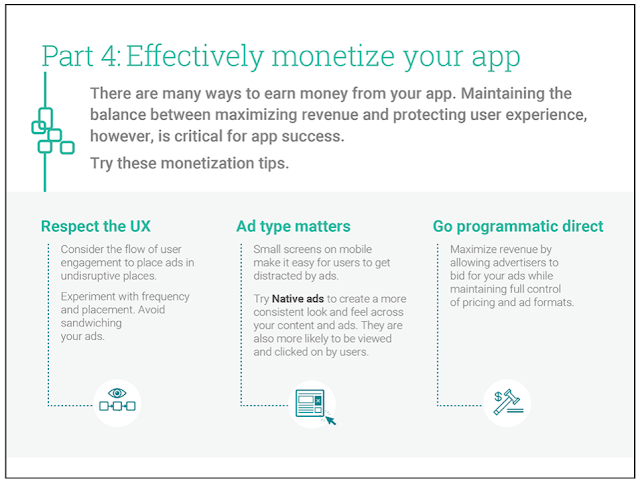
  1. Create ads that respect your UX: Good ad placements ensure reliable revenue without sacrificing user experience. Examine the flow of user engagement within your app to place ads in undisruptive places, such as the transition points in a reading app. You can experiment with the frequency and placements of your ads to ensure you’re delivering the right experience in the right context for the user. Try to avoid sandwiching them between your interactive app content and navigation/menu buttons.

  2. Choose the best ad formats for your app’s content structure: It’s easy for users to get distracted by ads given the limited screen size, especially when they don’t match the look and feel of your app.

    Try using Native ads to create a consistent look and feel across your content and ads. Formatted to fit mobile apps’ content and visual design, Native ads are more likely to be viewed and clicked by users. eBay recently started using our Native Ads on DoubleClick and experienced a 3.6X increase in ad engagement on average, with some campaigns delivering click-through rates up to 5%.

    Mark believes “Native presents an opportunity to reset on building premium quality mobile placements and creatives. Many publishers have already built custom formats for direct sales, but haven’t yet extended their advertiser reach by offering them via programmatic channels.”

  3. Build your programmatic direct strategy: Allowing you high quality creative formats from premium advertisers, programmatic direct introduces your app to new advertiser budgets and makes ad operations easier. As explained by Mark, “Many publishers have built incredible custom mobile formats that command high CPMs from high-quality advertisers. They can massively extend their advertiser reach, while retaining the same cpms and control, by offering these formats to new advertisers via programmatic channels.”

There is a fundamental shift amongst consumers in their use of mobile, making it indisputable that apps play a significant role in a consumer’s mobile experience. In the time that desktop audiences have grown 1%, mobile audiences have grown a staggering 41%1.

Focusing on ways to increase app discoverability, understand user engagement, optimize app quality, and effectively monetize your app, our mobile bootcamp outlines key steps for enhancing your mobile offerings in time for the holiday season of mobile frenzy.
Read More..

Sunday, October 9, 2016

Google I O 2015 Develop Engage Earn

Posted by Jason Titus, Senior Director of Engineering

This morning, we kicked off our 8th annual Google I/O conference, joined by 5,600 developers at Moscone Center, 530 I/O Extended communities around the world, and millions via the I/O Live stream. This year’s event is focused on delivering incredible experiences on mobile and helping developers build successful businesses through these key themes: Develop, Engage, and Earn.

During the keynote, we had a number of announcements that covered the evolution of the mobile platform, tools for Android, iOS, and Web developers, and the push towards more immersive mobile experiences with VR. Here’s a closer look at the news:

Develop

  • Android M Developer Preview — Get an early look at the next version of Android.
  • Google Play services 7.5 — Check out new features like Smart Lock for Passwords, new APIs for Google Cloud Messaging and
  • Google Cast, and the Google Maps API on Android Wear devices.
  • Android Studio 1.3 — Preview Android Studio v1.3, now with improved Gradle build speed, a new memory profiler, and full editing and debugging support for C/C++.
  • Polymer 1.0 — As the first production-ready release for the web components library, we’re also adding new product lines of elements. Features range from toolbars and menus to offline caching.
  • iOS & CocoaPods — Access your favorite libraries via CocoaPods, the official distribution channel for Google SDKs on iOS.
  • Cloud Test Lab — Building on the technology from our acquisition of Appurify, cloud Test Lab automates the testing of your mobile apps.
  • Firebase — Firebase makes it easy to build apps quickly, without spinning up servers or writing server-side code.

Engage

  • App Indexing — Index your app’s content into Google Search, just like you would with a website. Available for Android, and now piloting on iOS.
  • Google Cloud Messaging — As one of the most popular ways to send messages from the cloud to users devices on Android and Chrome, GCM is now also available on iOS.
  • Engagement on the Web — Access previously unavailable native functionality on the web with push notifications from your mobile website and add to homescreen.
  • Empowering successful global businesses on Google Play — Get new and powerful tools to help you further grow your business, improve decision making based on smarter insights, and engage and retain a valuable user base.
  • Universal App Campaigns coming soon — Set up app install ads with just a few inputs like your budget and the cost you’re willing to pay per user--we take care of the rest.
  • Measure App Installs Ads with Google Analytics — Measure app install campaigns based on engagement and lifetime value. On iOS, Google Analytics is now integrated with 20+ ad networks making it easy to understand how to spend your acquisition budget.

Earn

  • AdMob — Monetize your apps intelligently on a single platform, so you can gain insights about your users, drive more in-app purchases and maximize your ad revenue.

What’s Next

  • Android Nanodegree — Enroll in the industrys first Android Nanodegree, developed in collaboration with Udacity. The curriculum was built from the ground up s to meet the high standard we have for Android development. The Nanodegree covers everything from fundamentals to advanced development skills, as well as Google Play services and Material Design.
  • Cardboard SDK — The Cardboard SDK for Unity now supports both Android and iOS.
Read More..

Saturday, October 8, 2016

Her Lost Love v1 0 72 Android apk free Download

Her Lost Love v1.0.72 Android apk

Her Lost Love v1.0.72 Android apk free Download. For Trudy, experimental medication sends her back into the 1950s, when she was first starting out on her own in New York City. A chance meeting with a famous actor by the name of Martin Weiss leads to irrepressible feelings and a difficult choice. Only you can help her.

Game specification:
  • Name:   Her Lost Love
  • Developed by:   Difference Games LLC
  • Category:   Casual
  • Version:   1.0.72
  • Released:   January 21, 2014
  • Size:   47M
  • Requirements:   2.2 and up

Game Features:
  • A fantastic and bittersweet story
  • Stunning artwork and atmospheric music
  • Tons of mini games including Hidden Object, Dress Up, action and puzzles
  • 3 Different endings to discover

Install the game from the below given links and enjoy.

Link1 or Link2
Read More..

Friday, October 7, 2016

Google Keep save your thoughts from wherever—including iPhones


(Cross-posted on the Google Docs Blog.)

Forget fumbling with sticky notes or trying to recall that last item on your to-do list. When you’re trying to capture a moment or remember a task, Google Keep can help. And starting today, the things you love about Keep on the web and Android are now available on iOS:

  • Find what you need, quickly by searching and filtering your notes by color and type like images, audio and text. You can also add labels to help you organize your thoughts.
  • Set time or location-based reminders so you won’t forget to swing by the dry cleaners or miss an item on your shopping list.
  • Do more, together by sharing your notes so you can divvy up the packing list and watch as the items get checked off in real time.


Give the new Keep app for iOS a try (its rolling out today) and capture what’s on your mind!
Read More..

Thursday, October 6, 2016

Official Google Blog When patents attack Android

Official Google Blog: When patents attack Android
Read More..

HTC Google Play applications


It is now a common practice among different phone manufactures to re-distribute some of the system applications via Google Play store. Today we created a complete list of the HTC apps you can install on your HTC device. Keep in mind that to install and use some of them you might need to have a device running HTC Sense 6 launcher.


Name: HTC Camera
Version: 6.65.837374
Google Play: click here


Name: HTC Sense TV
Version: 2.7.832846
Google Play: click here


Name: HTC Service Pack
Version: 1.0.835811
Google Play: click here


Name: HTC Scribble
Version: 3.1.831220
Google Play: click here


Name: HTC Dot View
Version: 1.3.835614
Google Play: click here


Name: HTC Transfer
Version: 1.0.20313
Google Play: click here


Name: HTC BlinkFeed
Version: 6.3.835606
Google Play: click here


Name: HTC Clock
Version: 6.1.797217
Google Play: click here


Name: HTC Gallery
Version: 8.27.808455
Google Play: click here


Name: HTC Zoe
Version: 1.20.837872
Google Play: click here


Name: HTC Lock Screen
Version: 6.1.808627
Google Play: click here


Name: HTC Sense Input
Version: 6.2.795212
Google Play: click here


Name: HTC Power To Give
Version: 1.1.799648
Google Play: click here


Name: HTC FootballFeed
Version: 1.4.835533
Google Play: click here


Name: HTC Weather
Version: 6.2.836008
Google Play: click here


Name: HTC File Manager
Version: 6.1.835369
Google Play: click here


Name: HTC Fetch
Version: 1.2
Google Play: click here


Name: HTC RE
Version: 1.0.836077
Google Play: click here


Name: HTC Backup
Version: 4.0.798020
Google Play: click here


Name: HTC Guide
Version: 1.1.828291
Google Play: click here


There are also a few HTC Sense Input applications for a various of different languages, but usually none of them gets any update. The same situation happens to the HTC Speak app, which is also language dependent.

If you are working for a mobile company or some gadgets shop you might be interested in the HTC Specialist app.

Do you have any questions or comments? Feel free to share! Also, if you like this article, please use media sharing buttons (Twitter, G+, Facebook) below this post!


For latest news follow Android Revolution HD on popular social platforms:

Read More..

Wednesday, October 5, 2016

My fight with Samsung part 1


It is a common knowledge that the theory is one thing and the practice is sometimes completely different. Today Ive felt on my own skin how Samsung is trying to fool its customers. Keep on reading and please share this on any of your social network.

Some time ago I bought a Samsung tablet – Galaxy Note 10.1 (2014 Edition). Few days ago I realized that the S-Pen stylus is no longer working. The touch screen simply didnt react when I was trying to write anything on the front panel. So I took the device to the authorized Samsung service in Krakow - "W&K Wlodarski ?ukasz". 

How much I was surprised when I received a text message after 20 minutes that my device is ready to be picked up. When I came back I was told that the warranty is voided because of "unauthorized software integration". Lets now point out some important technical details.
  1. In ODIN mode: CURRENT BINARY: Samsung Official
  2. In ODIN mode: SYSTEM STATUS: Official
  3. Current OS: official P605XXUCNF2
  4. Kernel: official
  5. Recovery: official
  6. ROOTED: no!
So... what the f... hell? Where is the "unauthorized software integration"?

I asked the technician for some more details. He wasnt able to answer any of my questions. He wasnt able to show me this "software integration" and what would that be.

Lets now focus on the legal part. Warranty terms attached to my device do state about software modifications, but its a crucial ability to read it with understanding and a proper interpretation.


    What does it mean? The key word in this part is "due to". So basically, there has to be a causal link (a cause ---> effect relationship). So if the modified software caused the failure, the warranty does not cover it. But if the modified software has no relation with the failure, then YOU MUST FIX IT, DEAR SAMSUNG!

    The other very important thing is the burden of proof. The burden of proof is the imperative on a party in a trial to produce the evidence that will shift the conclusion away from the default position to ones own position. In simply words that means: if you say something - prove it! It is not MY obligation to prove that I havent modified the software. If you, dear Samsung claim that my warranty is voided because of software modification, you need to prove this software modification.

    To sum up this first part:
    1. Samsung service didnt prove their statement that I made an unauthorized software integration.
    2. Samsung service didnt demonstrate a causal relationship between the unauthorized software integration (if there was one) and the device failure.
    3. Samsung service refused to fix my device and the worker said "Sir you have no chance, just give up and leave".
    Few minutes ago I wrote a long e-mail to Samsung support centre, explaining the whole situation. What comes next? Lets wait for a part two...

    Please share it.

    Do you have any questions or comments? Feel free to share! Also, if you like this article, please use media sharing buttons (Twitter, G+, Facebook) below this post!


    For latest news follow Android Revolution HD on popular social platforms:

    Read More..