Pages

Saturday, November 5, 2016

Celebrating Newton’s discoveries How the master might have used Google Apps


(Cross-posted on the Google for Education Blog.)

Editors note: We’re jumping into our Delorean to explore how some of our favorite historical figures might have worked with Google Apps. Today, on the anniversary of Isaac Newton’s knighthood, we imagine his research in a Google Apps universe.

In April 1705, Isaac Newton was knighted for his many accomplishments. Since we’re self-admitted history nerds (how better to appreciate the advancements we enjoy now?) we asked ourselves: what if the Isaac Newton of 1705 used today’s Google Apps?

Newton was one of history’s foremost masters of mathematical formulation. What if he had been able to archive and automate his complex formulas in Sheets? We imagine he might have used the product function, =PRODUCT(factor1, factor2), to test different values for his second law of motion: force equals mass times acceleration (f = ma) — showing how apples of different sizes fall with different rates of acceleration from a tree.


While writing his famous Principia, Newton might have solicited feedback from his colleagues, like mathematicians Isaac Barrow and John Collins, by creating a Google Group and inviting them to edit in Docs. Working in Docs would have been helpful for keeping track of his notes while developing calculus — it might even have helped to avoid a heated debate with Gottfried Wilhelm Leibniz, who claimed he discovered it first. There’s no dispute over who first documents an idea when there’s access to revision history.


Newton famously feared criticism and was no stranger to controversy, so we imagine he would have been a strong advocate of using technology to keep his research secure. Should he have any concerns about a collaborator secretly passing sensitive information to his rival, Robert Hooke, he could adjust the sharing settings. He could even restrict the ability to view, share, download or print his treatise on optics after he’d already shared it.


Newton communicated through writing by hand — it’s estimated that he left behind about 10 million words of notes, letters and manuscripts — but we think he might have used Hangouts for urgent conversations. If Newton needed to speak with his colleagues at the Royal Society about whether Leibniz was guilty of plagiarism, he’d meet with them face-to-face on a Hangout. Or, if his wig wasn’t looking particularly great that day, he could’ve started a group chat and shared pictures of his calculus notation as evidence (maybe even including a few emoji to lighten things up).

As a professor at the University of Cambridge, Newton lectured about optics and presented his research about the properties of light. He might have shared illustrations of prisms to explain rainbows and the color spectrum, uploading the images to a shared Drive folder rather than passing around delicate hand-drawn sketches. Using Drive’s Optical Character Recognition, he could turn his handwritten notes into searchable text. Old notes he wrote on refraction and diffraction would be easy to find and reference as he developed new theories on the nature of light. As one of the most important thinkers and scientists of all time, how valuable would it have been for him to so easily archive and pull up his every great thought and idea?


Sir Isaac Newton’s findings changed our understanding of the world around us and are still relevant to our lives 300 years later. But even more inspiring is the way his curiosity and intellectual daring influenced generations of thinkers to be relentless in pursuing new ideas — a principle (pun intended) that drives us here at Google.
Read More..

Friday, November 4, 2016

Building Your Next Big Thing with Google Cloud Platform A Guide for Developers and Enterprise Architects

Building Your Next Big Thing with Google Cloud Platform: A Guide for Developers and Enterprise Architects

Building Your Next Big Thing with Google Cloud Platform shows you how to take advantage of the Google Cloud Platform technologies to build all kinds of cloud-hosted software and services for both public and private consumption. Whether you need a simple virtual server to run your legacy application or you need to architect a sophisticated high-traffic web application, Cloud Platform provides all the tools and products required to create innovative applications and a robust infrastructure to manage them.

Google is known for the scalability, reliability, and efficiency of its various online products, from Google Search to Gmail. And, the results are impressive. Google Search, for example, returns results literally within fractions of second. How is this possible? Google custom-builds both hardware and software, including servers, switches, networks, data centers, the operating system’s stack, application frameworks, applications, and APIs.

Have you ever imagined what you could build if you were able to tap the same infrastructure that Google uses to create and manage its products?

Now you can! Building Your Next Big Thing with Google Cloud Platform shows you how to take advantage of the Google Cloud Platform technologies to build all kinds of cloud-hosted software and services for both public and private consumption. Whether you need a simple virtual server to run your legacy application or you need to architect a sophisticated high-traffic web application, Cloud Platform provides all the tools and products required to create innovative applications and a robust infrastructure to manage them.

Using this book as your compass, you can navigate your way through the Google Cloud Platform and turn your ideas into reality. The authors, both Google Developer Experts in Google Cloud Platform, systematically introduce various Cloud Platform products one at a time and discuss their strengths and scenarios where they are a suitable fit. But rather than a manual-like "tell all" approach, the emphasis is on how to Get Things Done so that you get up to speed with Google Cloud Platform as quickly as possible. You will learn how to use the following technologies, among others:
  • Google Compute Engine
  • Google App Engine
  • Google Container Engine
  • Google App Engine Managed VMs
  • Google Cloud SQL
  • Google Cloud Storage
  • Google Cloud Datastore
  • Google BigQuery
  • Google Cloud Dataflow
  • Google Cloud DNS
  • Google Cloud Pub/Sub
  • Google Cloud Endpoints
  • Google Cloud Deployment Manager
  • Author on Google Cloud Platform
  • Google APIs and Translate API
Using real-world examples, the authors first walk you through the basics of cloud computing, cloud terminologies and public cloud services. Then they dive right into Google Cloud Platform and how you can use it to tackle your challenges, build new products, analyze big data, and much more. Whether you’re an independent developer, startup, or Fortune 500 company, you have never had easier to access to world-class production, product development, and infrastructure tools. Google Cloud Platform is your ticket to leveraging your skills and knowledge into making reliable, scalable, and efficient products—just like how Google builds its own products.

Read More..

Google Apps expands identity services with SAML and OIDC to connect apps securely


Millions of businesses rely on Google to be smart about how we protect employee logins to Google Apps services like Google Drive and Gmail. Today were making it easier to use that smart account security by giving employees secure single sign on access to a wider set of SaaS and custom-built apps on desktop and mobile devices. We’re enhancing our OpenID Connect (OIDC) Identity Provider support that can already be used with many SaaS apps in the Google Apps Marketplace, and adding support for SAML 2.0 (Security Assertion Markup Language) for more than 15 popular SaaS providers. We’re also making it easy for admins to add new custom SAML app integrations.


These single sign-on options help us address the growing demand for a central cloud based identity service and customers like Netflix are using Google’s identity services to make it easy for their employees to sign in to services.

“At Netflix we leveraged Google’s OpenID Connect standards support as part of our migration to a 100% cloud based single sign on solution.” - Justin Slaten, Manager, Enterprise Technology & Client Systems at Netflix

Googles identity services provide even more security on mobile when combined with Google Apps enterprise mobile management controls like password strength, lock screen requirements and app management. These can work in tandem with the increasing number of mobile security options, from hardware such as fingerprint readers, to software such as Google’s Smart Lock. Our Google Smart Lock features are available to all Google Accounts including those used at work. And we provide identity services and mobile management as part of Google Apps for Work at no additional cost. Learn more about how you can use Google identity services for work in our new Identity whitepaper.

"Google Apps identity service has made single sign on to services we use every day like Salesforce and Zendesk much easier for end users, who save an hour per month; our support team, which has seen a 25% reduction in support tickets; and our IT team, which spends 20% less time on troubleshooting." - Vadmin Solovey, Founder & CTO, DoIT International

Developers who don’t yet use single sign on to Google Accounts for work can follow our API guides in the Google Identity Platform documentation to enable these new features.

Want to learn more about best practices in this space? Hear Justin Slaten from Netflix share his insights on providing stronger identity and login protections for employees at the upcoming Identify 2015 events in New York, San Francisco and London and hosted by Ping Identity. There, you can also hear Eric Sachs, Google’s Product Management Director for Identity, discuss how these same standards are being used in work and consumer identity systems.
Read More..

Thursday, November 3, 2016

HubSpot embraces top tech tools like Google Apps to meet employee demand


Editors note: Today’s guest blog comes from Jim O’Neill, Chief People Officer at HubSpot, the world’s leading inbound marketing and sales platform.


As a fast-growing SaaS company providing the world’s leading inbound marketing and sales platform, top technology solutions aren’t just a bonus at HubSpot; they’re an expectation. We aim to hire savvy employees who expect the benefits of modern, efficient tools for better collaboration and mobility. Our dynamic workforce appreciates the latest technologies, and as a business we need to stay up to speed. The relationship between people and technology is especially important to me as HubSpot’s chief people officer and former chief information officer; I’m particularly focused on how our people are adopting new technology.

We switched from Microsoft Exchange to Google Apps in 2010 when the cloud was still more of an idea than a reality for most businesses. We loved that Apps allowed us to work from anywhere and that many of our employees already loved using tools like Gmail and Google Docs. Plus, our costs are now more than three times less per user, per year, using Google Apps.

Apps eliminated worries about system maintenance and upgrades, while offering us the storage space we needed. For example, our co-founder and CTO Dharmesh Shah stores more than 20GB of data in his inbox alone.

Five years after going Google, employee adoption continues to drive our technology decisions. We observe the products that are gaining traction among our team and standardize on the ones that reach critical mass. We also collect feedback about our team’s technology preferences and usage.

In addition to Apps, we’ve also seen the growing popularity of other tools, like messaging platform Slack. A huge benefit of these types of products (similarly to Apps) is that they require little or no IT maintenance. We can measure this by the number of IT tickets we receive, which dropped from dozens regarding things like syncing issues and PST file corruption to nearly none as a result of using easy-to-manage, cloud-based tools like Apps.

In addition, we’ve integrated Chromeboxes and Hangouts into daily life at HubSpot. Nearly half of our conference rooms are equipped with Chromeboxes, and nine times out of 10 our employees request this set-up over proprietary third-party hardware that is historically quite expensive when compared to Chromebox. As an employee preference and more than 4x cost saver, Chromebox is an ideal solution for on-the-spot or routine team meetings. People love the flexibility to stay connected with their teams, whether through ad hoc chats or planned meetings. We even have a team member named Jordan who is based in Alabama and connects through video Hangout almost all day, every day. We also use Hangouts on mobile to chat on the go. When you’re constantly in transit, like I am, the mobile experience is key.

HubSpot is focused on creating a leading technology platform, and the products we use should reflect this goal. The future of work involves tools that are available on the public Internet — legacy systems with VPNs and private networks require more IT maintenance and cause friction, which just doesn’t cut it for us. We’re constantly prioritizing how we can offer our employees the latest and greatest tech, and Google plays a major role in helping us achieve this.
Read More..

Wednesday, November 2, 2016

Mobile Bootcamp Part III Focus on quality

Originally posted on DoubleClick Publisher Blog

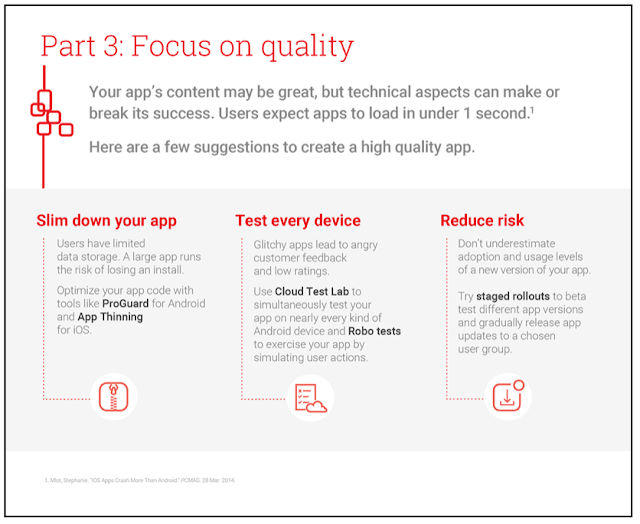
At this point, you’ve read our recommendations for growing your app’s audience and keeping users engaged. But there are technical aspects, too, that can make or break your app’s success. Speed, for example, is crucial -- users expect apps to respond in under one second.

Yesterday, we gave recommendations for attracting, engaging, and retaining your users. Continue reading today to learn tips from Dev Gogate, Mobile Solutions Consulting Manager at Google, on providing your users with a high quality app.

  1. The smaller the app size, the better: Users have limited bandwidth and data storage, so a large app runs the risk of losing an install. App stores impose size limits and will only deliver apps under a certain size over cellular connections; Google has a 50MB limit for each APK (but allows 2GB expansion files for supporting media) and Apple limits app size at 100MB. Use the ProGuard tool to optimize your Android code and enable Resource Shrinking to remove unused and unneeded resources from dependency libraries. App Thinning offers a similar solution for decreasing app size on iOS.

  2. Build apps that use device resources optimally: Building apps without taking into account how display interacts with hardware components can drain precious resources, such as battery life. According to Dev, "App performance is critical! A badly designed app can drastically and negatively impact the the users perception of the apps usability and will surely lead to an uninstall." Dev recommends compiling a list of metrics for your apps to perform against and then running tests. This YouTube Android performance channel and Google+ community offer excellent tips on building high performing apps.

  3. Ensure your app works across devices: Failing to catch a bug or crash that only impacts some devices quickly leads to angry customer feedback and low ratings. Dev recommends using Cloud Test Lab to simultaneously test your app on nearly every brand and model of Android devices and across multiple languages, screen orientations, and Android API versions. Dev’s expert tip: Even if you have not written any instrumentation tests for your app, you can use Robo tests to exercise your app by simulating user actions.

  4. Use A/B testing to get real user feedback: Dogfooding your app provides early insight into how users interact with your app and how it behaves beyond the test lab. Beta testing, on the other hand, gathers feedback from an enthusiastic audience. Since this testing is customer-facing, ensure the process is simple to ensure high user participation. Both of these tests gives you early feedback from users before widely releasing your app.

  5. Launch new app versions in phases and closely monitor: Don’t underestimate the number of users who may adopt a new version of your app and their levels of usage. Dev recommends using staged rollouts, which allow you to beta test different app versions and gradually release app updates with a chosen user group. The Cloud Test Lab provides access to virtual devices that give rapid feedback during development, as well as physical devices that pinpoint issues found on real, physical devices.

Creating a high quality app is essential for building and maintaining a loyal user base. Follow Dev’s recommendations to optimize your app quality and stay posted for our post tomorrow on ways to effectively monetize.

Read More..

Custom email apps and more for Google Domains


(Cross-posted on the Google and Your Business Blog.)

Last year we introduced Google Domains in the U.S. to make it easy for your business to get online with a domain name and website. We wanted to make finding, buying and managing domains for your business simple, and we partnered with best-in-class website builders like Blogger, Shopify, Squarespace, Weebly and Wix to help you create your site no technical experience required.

Since then, weve helped people register hundreds of thousands of domain names and create tens of thousands of websites, many of whom are businesses like yours looking to build and expand their online presence. Through your continued feedback, today we’re introducing upgrades to improve the Google Domains experience by adding:

  • Custom email addresses create an email address like, you@yourdomain or sales@yourdomain via Google Apps for Work.
  • Over 90 new domain name endings  purchase domains with new endings like, .life, .world, .business, .cool, .pizza, .gifts, and .football (here’s the new full list).
  • Domain ownership transfer  allows you to always make sure the right person is managing the right domains (learn more here).

Custom email addresses are a key part of building your online identity. Email addresses such as you@yourdomain help you establish credibility when you communicate with customers. Setting up a custom email address with Google Domains is an optional service for $5/month/user, and with that you’ll also get the full Google Apps for Work productivity suite. Google Apps for Work includes helpful business tools like video meetings, shared calendars, online document editing and 30 GB of file storage.
New domain name endings offer more choice and flexibility as you pick a memorable address for your business website. New endings are continuously opening up to the web, like .legal, .accountant and .services, and can help you create a name that matches who you are and what you do. Check out some of the people on Google Domains already using these new domain name endings: sublimation.kitchen, smilesnap.social, thecooler.ninja, and marcblair.photography.
It’s our mission to help your business easily get online and succeed with a domain name, and we want to make sure we continue to offer you the best tools and experience possible in our beta. So, if you have any input, questions or feedback, please don’t be shy!

See you online at www.google.com/domains.
Read More..

Tuesday, November 1, 2016

First custom ROM based on HTC Sense 5 5 is out for HTC One!

Yes, here it is! The one youve been waiting for! Android Revolution HD 30.0 is the world first custom ROM for the HTC One based on Android 4.3 and new HTC Sense 5.5 UI.

Just grab it from downloads section!

My XDA-Developers thread with link to follow my work - http://goo.gl/UajIh2

Have any questions or comments? Feel free to share! Also, if you like this article, please use media sharing buttons (Twitter, G+, Facebook) below this post!
Read More..